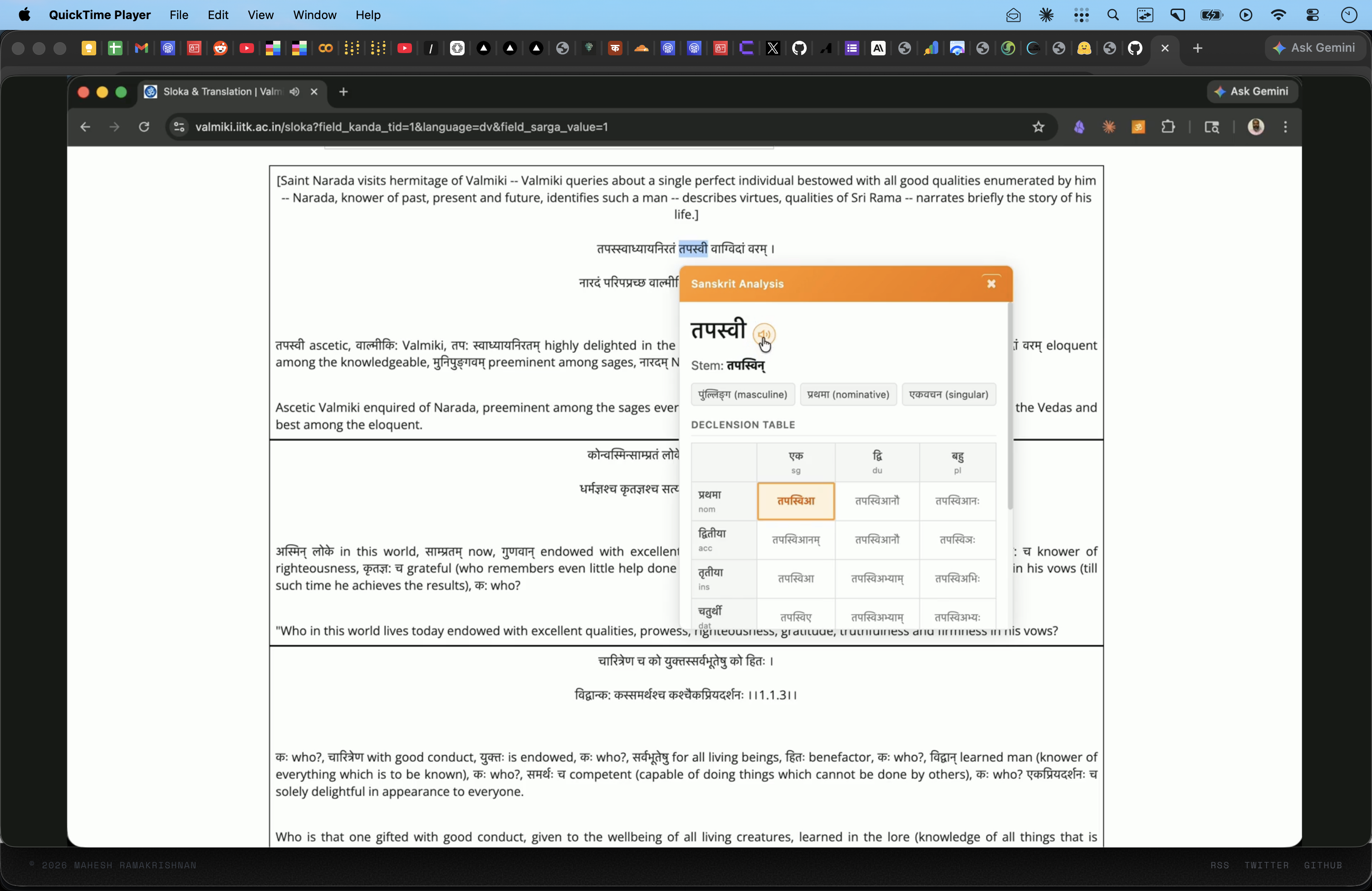
The first version of Sanskrit Aid was basic — select a Devanagari word on any webpage, get a grammatical breakdown. It used the sanskrit-parser API for analysis and had hardcoded declension tables for about 13 stem types. Functional, but limited.
v0.2 is a significant upgrade. Three new capabilities: proper declension tables powered by Vidyut, two-tier sandhi/compound splitting, and audio pronunciation.
Vidyut for Declensions
The hardcoded declension tables in v0.1 were a hack. Manually entering paradigms doesn't scale, and I was covering only common patterns.
For v0.2, I switched to Vidyut — Ambuda Org's Paninian grammar engine written in Rust. Vidyut implements actual Paninian rules for Sanskrit morphology, which means it doesn't just look up tables — it derives forms the way Panini's grammar system prescribes.
I wrote a Python script using Vidyut's bindings that generates complete paradigms:
- For each stem, it creates a
Pratipadika(dictionary entry) - Iterates through all 8 vibhaktis (cases) x 3 vacanas (numbers) = 24 forms
- Calls
vyakarana.derive(Pada.Subanta(...))to generate each inflected form - Outputs in all three scripts: Devanagari, IAST, and SLP1
The output covers a-stems (राम pattern), ā-stems (रमा), i-stems (कवि, मति), u-stems (गुरु), ṛ-stems, an-stems (राजन्, ब्रह्मन्), s-stems (मनस्, तपस्), and pronouns. 120+ paradigms, 1,722 word forms total. All bundled into a 336KB JSON file that ships with the extension — so declension lookups are instant and offline.
The extension also builds a reverse lookup index: given any inflected form, it can find the stem and show you exactly where that form sits in the full paradigm. You don't just see "this is dative plural" — you see the entire family with your current form highlighted.
Two-Tier Sandhi Splitting
Sanskrit's sandhi system joins words together in ways that make them hard to recognize. तपस्वाध्यायनिरतम् looks like one word but is actually तपस् + स्वाध्याय + निरतम् (ascetic + self-study + devoted). A learner needs to see the components.
v0.1 only used sanskrit-parser — an open-source morphological analyzer hosted at sanskrit-parser.appspot.com. It handles straightforward splits well but struggles with deep compounds.
For v0.2, I added Dharmamitra from BDRC (Buddhist Digital Resource Center) as a second tier. The flow:
- Try sanskrit-parser first (fast, handles simple sandhi)
- If it can't split the word, fall back to Dharmamitra's
/api/tagging/endpoint (handles deep compounds) - If both fail, show the word unsplit
There's a small wrinkle: Dharmamitra expects IAST input, not Devanagari. So the service worker converts the word to IAST before calling the API, then converts the split components back to Devanagari for display. The transliteration module handles SLP1-Devanagari-IAST conversions — about 266 lines of mapping code.
Both APIs are cached for 24 hours in the service worker, with LRU eviction at 1,000 entries.
Audio Pronunciation
This was the most involved addition. The pipeline:
Chrome Extension  →  Cloudflare Worker  →  HuggingFace Space
                      (R2 cache)             (GPU inference)
The TTS model is ai4bharat/indic-parler-tts (0.9B params), running on HuggingFace's ZeroGPU (A100). A Cloudflare Worker sits in front as a cache layer — first request for a word triggers GPU inference, the audio gets stored in R2, and all subsequent requests are served from cache.
GPU budget is about 25 minutes/day on the HF Pro plan ($9/mo), enough for 100-150 new words daily. Once a word is cached, it's there permanently.
After deploying, the pronunciation had a Western accent. Unusable for a Sanskrit learning tool.
Two root causes:
Float precision. The model was loaded without specifying torch_dtype. HuggingFace's ZeroGPU environment defaulted to float16. For a 0.9B model that fits in float32 (~3.6GB), the precision reduction was unnecessary — and introduced subtle artifacts that manifested as accent drift.
Generic voice descriptions. indic-parler-tts uses text descriptions to control voice. I was using generic prompts like "A male speaker delivers very clear speech with slow speed." But the model was trained with named Indian speakers as anchors. Without specifying a name, it defaulted to a Western-sounding voice.
Fix: explicit torch_dtype=torch.float32 + switch to "Aryan" — a named speaker preset with a 99.79% Native Speaker Score.
But the R2 cache had 854 audio files generated with the old voice. Had to purge the entire cache (1,517 objects, 215 MB → 0) and let it regenerate. Added a temporary /purge-cache endpoint to the Worker, batched deletes in groups of 100 to stay within CPU limits, then removed the endpoint.
Playback UX
The other audio problem was simpler: no visual feedback during fetch. Users would double-click and hear the word twice. Added three button states — idle (speaker icon) → loading (spinner, clicks disabled) → playing (pause icon, click to stop).
Other Changes
Branding. Renamed from "Sanskrit Learner" to "Sanskrit Aid" across 13 files. New icon — Om symbol on saffron gradient, edge-to-edge design.
Extension hardening. When Chrome updates an extension, content scripts on open pages lose their service worker connection. Added chrome.runtime?.sendMessage guards and a "please refresh" message instead of a silent TypeError crash.
Tests. 31 tests (Vitest) covering sandhi splitting against Ramayana 1.1.1, transliteration round-trips, and grammar tag parsing.
What's Next
- Verb conjugation tables
- Sentence-level grammatical visualization
- IAST transliteration toggle
- Firefox/Brave support
- Chrome Web Store submission (ready, just need to register and upload)
Credits
This update leans heavily on work by others:
- Vidyut by Ambuda Org — the Paninian grammar engine that makes proper declensions possible
- Dharmamitra by BDRC — compound splitting that catches what simpler tools miss
- sanskrit_parser — the first-tier sandhi splitting API
- ai4bharat/indic-parler-tts — the TTS model
- Sanskrit Heritage Site by Gerard Huet — reference for grammar rules
Code is on GitHub. If you're learning Sanskrit and find this useful, I'd like to hear about it.